
Golf GPS Watch vs Laser Rangefinder: Which Solves Your Distance Problem?
Mapped green context or a visible target: choose the number that answers your question.
Original conceptual illustration; not a product or test photograph.
A golf GPS watch vs laser rangefinder decision starts with a question about the information you are missing. Do you want a quick picture of the green and the hazards around it, or a distance to a particular object you can see? Those jobs overlap, but they are not identical. Buying the more detailed-looking display does not guarantee that it answers your usual question more clearly.
This is a research-led buying and use guide, not a hands-on accuracy ranking. The named devices illustrate verified manufacturer features, while the on-course comparisons are suggested checks you can adapt during an appropriate practice round. No device has been field-tested for this article, and there are no affiliate links.
The practical choice involves more than precision. Consider how easily you can read the result, whether you can identify the target, how you will manage charging and whether the functions you use are permitted in your competition. A device is useful when its information fits naturally into a sensible routine, not when it supplies an impressive number you cannot confidently interpret.
Green context
Read the labels: front, middle and back are different points.
Visible target
Confirm which object produced the reading.
Your actual routine
Try the controls and display with your normal equipment.
Rules and modes
Check the Committee notices and exact device instructions.
Golf GPS watch vs laser rangefinder: define the missing answer
Area information and target information
Typically, a golf GPS watch gives distances to mapped positions such as the front, middle and back of a green. A laser rangefinder measures a target you aim at. That means a watch can be helpful when the relevant green area is not fully visible, while a laser can help identify the distance to a visible flag or other suitable object. Check the exact functions of the model rather than assuming every device includes the same features. [1] [2]
Before comparing products, describe three occasions when you wished you knew more. Perhaps a blind approach leaves you uncertain about green depth, or a visible flag seems much nearer than the middle-marker distance. Another golfer may mainly want a fast reminder of the distance to a lay-up area. These are more informative buying notes than simply wanting better yardages.
Choose a primary task
Name one task that matters most. Then decide which secondary functions would genuinely support it. A watch with many extra screens may be less convenient for someone who only wants a readable middle distance. Equally, a simple laser might be insufficient for a player whose recurring question concerns a mapped hazard hidden by a rise.
There is no need to make the choice a statement about playing ability. Newer and experienced golfers can both prefer simple information. Instead, consider your usual course, the decisions that create uncertainty and how much interaction you want before a shot. The right category is the one that removes that uncertainty without adding an awkward routine.
Understand what a GPS number represents
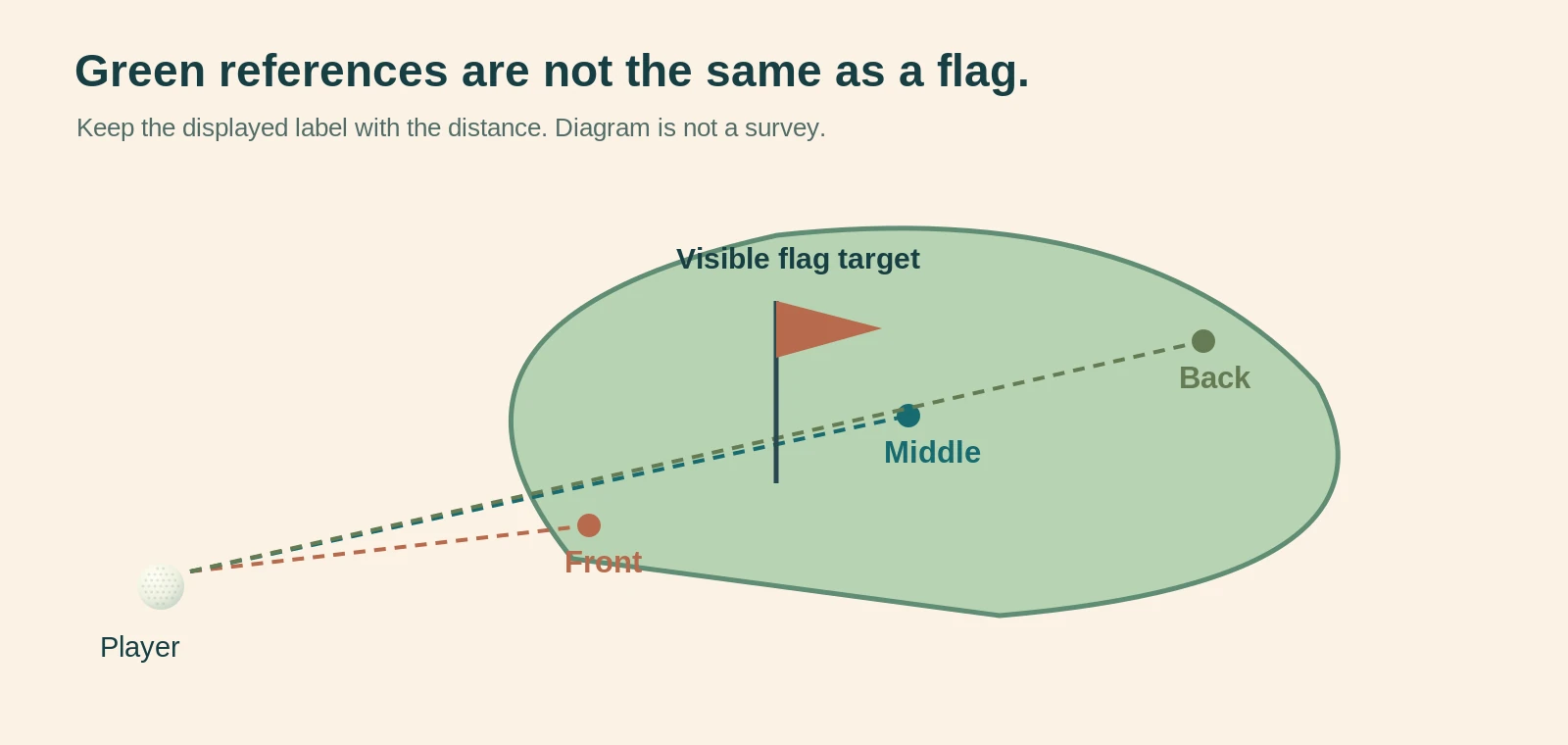
Mapped points are not a live flag survey
Front, middle and back are useful reference positions, but the middle is not automatically the day's hole location. Some watches allow a manual pin position on the displayed green. That remains a user-selected position, not proof that the watch has independently located the flag. Garmin's Approach S12 lists both front/middle/back distances and manual pin positioning. [1]
Consequently, read the labels as well as the number. A middle distance should not be criticised for differing from a laser measurement to a front flag; they can be answering different questions. Likewise, changing a manual pin marker carelessly may create an apparently precise number attached to an uncertain location. Leave it as a reference rather than pretending the uncertainty has disappeared.
Check course and hole selection
A readable screen is only helpful when the selected course and hole match where you are playing. Include that check when starting a round, and revisit it after any unusual route between holes. If a displayed distance looks implausible, verify the context before concluding that your club selection or memory of the hole must be wrong.
Course information can also need updating. Check the device's supported update process and whether your actual course is listed, rather than relying only on a headline total of courses worldwide. A very large database does not answer the narrower question of whether your preferred layout and its recent changes are represented accurately enough for your use.
Understand what a laser number represents
The device cannot choose the target for you
Every laser reading must be associated with the object actually acquired. A number on the display is not, by itself, proof that the flag was measured rather than something behind it. Target-lock features can assist, but your routine should still include identifying the intended object and checking that the result makes sense in the setting.
On a suitable practice occasion, aim at a clearly visible target, lower the unit and repeat. Compare consistency without treating repeated readings as independent proof of absolute accuracy. You may repeatedly acquire the same wrong object. If the flag and background are difficult to separate, a broader mapped reference or another known course reference may be more useful than repeatedly accepting an uncertain result.
Range specifications need context
Manufacturers can quote different maximum ranges for flags and larger targets. Bushnell's European A1-Slope page, for example, separates its stated flag range from its longer total ranging capability. It also lists an accuracy specification, which is a manufacturer claim rather than a result from this article. [2]
Do not read a maximum-distance headline as a guarantee that every small flag will be acquired at that distance in every condition. For buying purposes, ask whether the device can comfortably perform the ordinary target task you need. An impressive far-distance number may have little relevance to someone primarily checking approach shots and nearby practice targets.
Why two different numbers can both be useful
Compare the same reference before judging disagreement
Imagine a watch showing 141 yards to the front, 154 to the middle and 169 to the back, while a laser shows 147 to a visible flag. These are hypothetical numbers, not a field test. If the flag is towards the front, the laser result may fit comfortably inside the watch's green-depth picture rather than contradict it.
The useful response is not to average the two values. Averaging different target distances produces a new number that may describe nothing you intended to measure. Instead, identify the target behind each reading. The laser can help locate a visible flag within the broader reference, while the mapped front and back help you think about available space.
Investigate a genuinely implausible result
A laser reading apparently beyond the watch's back-of-green reference deserves a check, but it does not establish which device is wrong. Reconfirm the selected hole, the target, the unit of measurement and any active adjusted-distance mode. Then compare against another reliable reference available on the course without holding up play.
If uncertainty remains, use the information conservatively and investigate later. Do not turn a doubtful display into permission to play towards people who may be out of sight. Distance information does not establish that a landing area is clear. Your normal course-safety checks remain necessary regardless of how detailed or expensive the device is.
Compare the categories by decision, not by marketing
A practical comparison table
The following comparison is based on the normal distinction between mapped references and aimed targets. It is not a ranking of every watch or laser. Some products combine technologies, and premium functions can change the comparison. Confirm the actual model's manual when a particular feature is important to your purchase.
Think about which row describes your most frequent uncertainty. A device that performs well at a task you rarely need may still be a poor purchase. Conversely, a basic unit can be useful when it clearly answers the repeated question you bring to it. The aim is a better match between information and decision, not collecting every possible function.
Category-level decision guide. Confirm functions on the exact model; hybrid products can differ.
| Your question | GPS watch approach | Laser approach |
|---|---|---|
| How much green is available? | Mapped front / middle / back on supported models. | Aimed objects do not automatically define every green edge. |
| How far to that visible flag? | Middle distance is not automatically the flag. | Measures the acquired target; check it is the intended one. |
| What about a hidden feature? | Supported mapping may provide useful context. | A target must be acquired; it cannot reveal every hidden feature. |
| Which fits my routine? | Wearing, readable screens and charging. | Retrieval, aiming, reading and safe storage. |
Do not assume more functions mean less uncertainty
Additional displays can introduce extra interpretation. A highly detailed map is useful only if you understand its symbols and can find the relevant screen comfortably. An adjusted distance is useful only in a context where that function is allowed and where you understand what has been adjusted. More digits do not remove uncertainty about the target or conditions.
Choose a shortlist by essential tasks, then compare the interaction required. How many actions take you from a blank screen or closed case to the information you need? Can you return to the basic view easily? A device that supports a calm, repeatable routine may be preferable to one that encourages repeated checking without changing the decision.
Check the rules before relying on a mode label
Distance is not the same as every available function
The R&A permits obtaining distance or directional information under Rule 4.3, while certain other uses, including measuring elevation changes and receiving specified shot advice, are not permitted. The Committee can also prohibit electronic distance-measuring devices through Model Local Rule G-5. Check the terms for your actual competition rather than assuming a general product label settles the question. [3] [4]
A device may contain both permitted and prohibited functions. Therefore, learn how to disable the functions that are not allowed for the round, and confirm the setting before starting. A familiar brand name, tournament label or previous use at another club is not a substitute for checking the relevant rules and local conditions.
Make the compliance check part of preparation
Before a competition, read the Committee's notices and the exact device instructions. Ask the Committee when the position is unclear. Keep the process simple: establish whether the device may be used, which functions must remain off and how you will recognise the correct setting. Do this before the first tee rather than experimenting while others wait.
For the A1-Slope example, Bushnell describes switching slope on or off through its mode button. That is a model-specific control, not proof that every Bushnell unit or every laser uses the same method. [2] Practise the operation at home, then verify it on the device you are carrying. Do not rely on memory from a different model.
Check readability with your normal equipment
Test the interaction, not only the specification
Where a retailer demonstration is available, view a watch at the position you would normally read it and look through a laser as you would on the course. Wear your usual corrective lenses or sunglasses where relevant. Check whether numbers, icons and mode labels are comfortably distinguishable without changing your normal routine substantially.
A quoted screen dimension or magnification cannot fully answer that personal usability question. Nor should you infer that difficulty reading one device means you need a different category in every case. Another display layout or eyepiece arrangement may feel different. Record the exact difficulty, such as small labels or trouble identifying the target, before comparing alternatives.
Include hands, sleeves and storage
Try the controls with the glove or outerwear you expect to use, following the demonstration conditions. A watch might sit under a cuff; a laser may need retrieving, uncovering and returning to its case. These are practical interactions worth checking, particularly when you want a device that remains straightforward in colder or wetter weather.
Do not deliberately expose a shop sample to water or rough treatment to test a rating. Read the model's specified protection and care instructions instead. For your own equipment, keep lenses, contacts and charging arrangements maintained as directed. Usability includes looking after the device so the display you rely on remains readable and the unit remains ready to use.
Decide how the device fits your pace of play
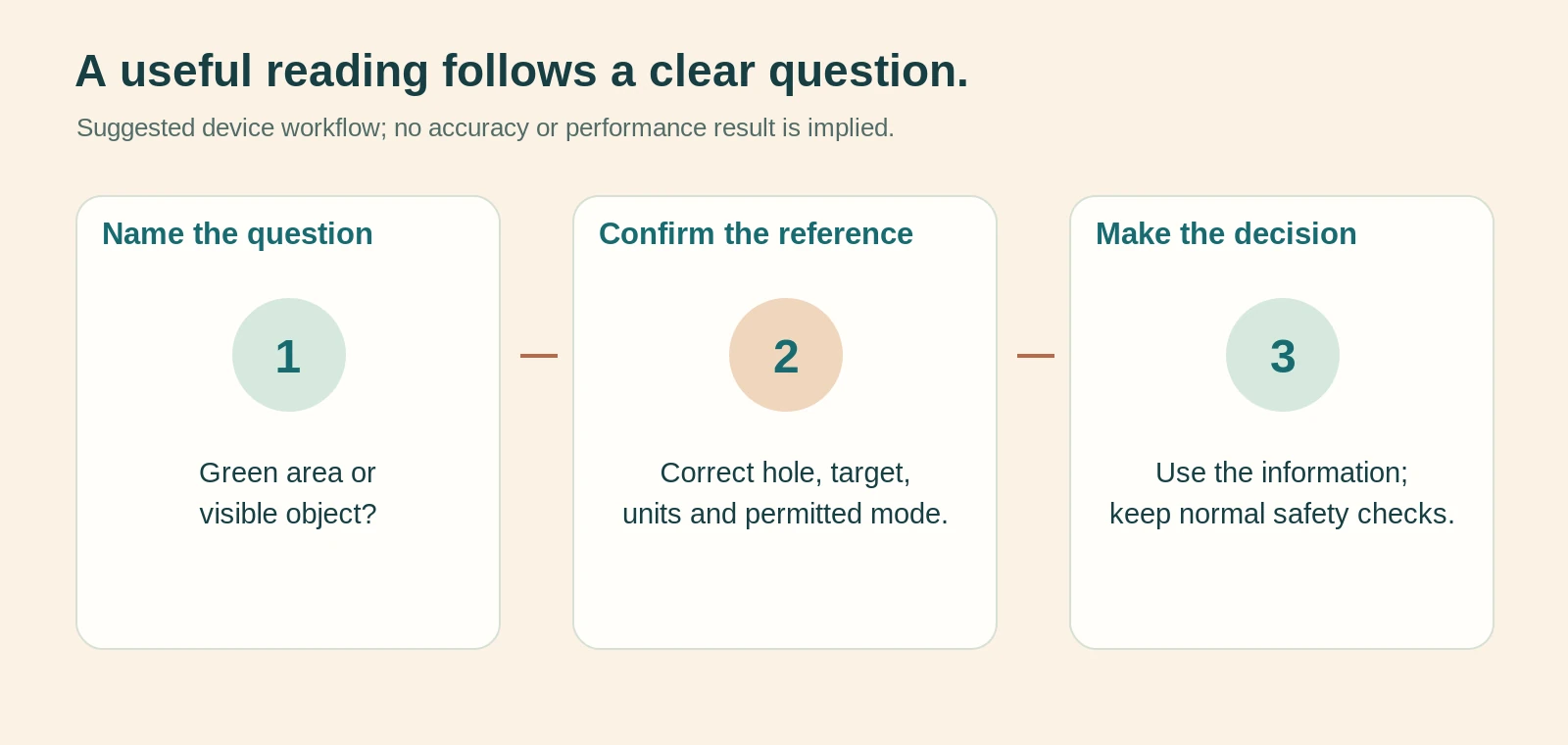
Use a short information routine
A sensible routine identifies the question, obtains the relevant information and moves on to the shot decision. With a watch, that might mean confirming the hole and checking the green reference. With a laser, it might mean identifying the flag, acquiring a plausible reading and returning the unit to its case. Practise this during an appropriate non-competitive session.
Repeatedly opening new screens or taking extra readings can become a habit even when the information is no longer changing your decision. Set a practical limit based on your actual needs rather than treating every shot as a device comparison. When a reading is doubtful, use an alternative reference or make a conservative choice instead of creating a prolonged investigation during play.
Keep retrieval and storage predictable
Choose a safe, consistent place for the laser or its case that suits your bag and the manufacturer's carrying advice. For a watch, check the fit and whether it interferes with your preferred sleeve arrangement. The aim is to avoid searching for equipment or adjusting it repeatedly, not to prescribe one carrying method for every golfer.
After a round, use the same return routine: check that the device is with you, inspect it as appropriate and prepare it for the next outing. A device with an excellent specification is of little use if it is left in a buggy or arrives uncharged. Small organisational habits can matter more to everyday usefulness than a marginal feature difference.
Plan charging from your actual schedule
Compare stated measures carefully
Garmin lists up to 30 hours in GPS mode for the Approach S12. Bushnell's European A1-Slope page expresses battery life using rounds and target acquisitions. These are different manufacturer measures, not a directly comparable head-to-head endurance test. They also do not establish the remaining life of a particular used device. [1] [2]
For your decision, describe the longest period you reasonably expect between charging opportunities. Then read the exact model's battery information and charging requirements. A headline watch-mode figure is not the appropriate reference for a GPS golf session. Likewise, a round-based figure should be understood in the context the manufacturer gives rather than treated as a universal number of complete outings.
Keep the charging arrangement realistic
Check the cable or connector, whether the required accessories are included and how the unit will be charged at home or away. Do not assume a familiar-looking port means every charging arrangement is suitable. Follow the manufacturer's instructions, especially around wet equipment, damaged cables or abnormal battery behaviour.
For a used purchase, ask about charging function and battery condition without expecting a seller's vague claim that it lasts ages to settle the matter. A practical demonstration within appropriate conditions can help, but it is not a full endurance test. Decide whether the uncertainty is acceptable before buying, particularly if replacement or service options matter to you.
Treat updates, apps and subscriptions as separate questions
Identify what works without extras
Make a list of the functions you actually need and ask which are available on the device itself. Then separate optional app features, accessories, accounts and paid services. Do not infer that a watch requires a subscription merely because its manufacturer offers one, or that every advertised feature is included indefinitely at no additional cost.
Check the exact product page and current service terms at purchase. Where an app is necessary, confirm compatibility with your phone and whether you are comfortable with the account and data arrangements. A device can be technically capable yet inconvenient for someone who does not want another phone-dependent workflow. That preference is a legitimate part of choosing equipment.
Verify support for the model you are buying
Look up the complete model name and generation, especially with a used or discounted unit. Similar names can hide different update methods, controls and supported accessories. Keep a copy of the relevant manual and note where the official support information is located. Avoid basing a purchase on a review of a neighbouring model.
Also check how course corrections or mapping concerns can be reported. You do not need to predict every future change, but you should understand the available process. For a laser without course mapping, this particular issue may be less relevant, while battery, optical care and service remain important. Compare ownership tasks according to the category rather than forcing identical checklists onto both.
Run a practice-round comparison without inventing an accuracy test
Choose appropriate situations
With permission and without delaying others, compare a few ordinary situations during a practice round: a visible flag, a green partly hidden from view and a decision involving a mapped hazard. Use borrowed or demonstrated equipment only within the owner's conditions. The purpose is to learn which information helps you, not to claim laboratory accuracy from a handful of shots.
Before looking at either device, state the question you want answered. Then record which device provided a useful answer and how much interpretation was needed. A laser may supply a precise-looking number but fail to answer a question about the back of a hidden green. A watch may provide helpful context without telling you the exact location of a visible flag.
Record usability separately from outcomes
Use notes such as readable at a glance, difficult target against background, easy to confirm hazard or too many screens for my routine. Do not use a good shot as proof that the device measured correctly, or a poor shot as proof that it failed. Shot execution and equipment information are different parts of the situation.
If you record times, label them as your own observations under those conditions, not a general speed claim for the product. Likewise, do not average different target distances to produce an accuracy score. A useful comparison can remain qualitative: which questions were answered clearly, which remained uncertain and which device you would comfortably use again.
Distinguish hazard references from a complete safe route
Identify the edge or object behind a distance
When a device offers hazard information, read what the value represents. A distance to a near edge, a carry requirement and a visible object beyond the hazard are not interchangeable. Check the exact model's symbols and manual, then confirm that the reference makes sense from your position. Do not turn an unlabeled number into a carry instruction simply because it appears beside a hazard icon.
For a hypothetical practice example, imagine two distances labelled near and far for a feature. Your decision should preserve those labels, not average them or choose the smaller because it feels more achievable. A laser aimed at a tree beside the same feature answers another question again. Before choosing a club, make sure you know which location each value describes and which location your intended shot needs to reach or avoid.
Keep the device separate from the shot judgement
Even a well-understood distance does not establish that the planned shot is appropriate from the current lie. Consider the normal factors you use in shot selection and seek coaching where the decision remains uncertain. The device supplies information, not permission to attempt every carry whose number looks close to a remembered best shot.
This distinction is useful when deciding which category to buy. A golfer who mainly needs broader positional references may value a watch's supported mapping functions. Someone checking a visible intermediate object may prefer a laser. Neither tool replaces understanding the shape of the hole, the location of other players or your own realistic options. Buy for the information gap, while keeping the actual playing judgement with the golfer.
Compare a borrowed device without changing your whole routine
Give the demonstration one clear purpose
Before borrowing a friend's device, agree how and where it may be used and ask them to demonstrate its basic controls. Confirm its units and modes rather than assuming their preferences match yours. Use the trial to answer one purchasing question, such as whether the display is readable at a glance or whether you can reliably distinguish the flag from its background.
Avoid changing several unfamiliar settings during the round. That can make the device feel more complicated than it would after normal preparation, and it risks returning it in a configuration the owner does not expect. Where a setting must change, note it and restore it with the owner's agreement. A respectful, narrow demonstration provides useful evidence without turning someone else's equipment into an uncontrolled experiment.
Decide what the trial did not establish
A short loan can show that a control feels awkward or that a display suits your normal eyewear. It cannot establish long-term battery condition, future mapping support or reliability in weather you did not encounter. Keep those ownership questions for the manufacturer's information and the exact unit offered for sale.
Likewise, a demonstration of a premium model does not prove that a cheaper product in the same brand behaves identically. Record the model name and the particular feature that mattered. Your eventual shortlist should match that evidence, not simply the logo. If the trial leaves the main question unresolved, delay the purchase rather than treating a pleasant afternoon with borrowed technology as a complete buying assessment.
When owning both makes sense
Complementary information can be useful
A golfer may value a watch for a continuous green-depth reference and a laser for selected visible targets. That combination can answer more than either alone, provided the information is used for distinct purposes. It does not mean every shot requires two readings or that the more expensive combination will automatically improve scoring.
Before buying a second device, identify an actual gap in the first. For example, you may like the watch's mapped information but repeatedly want a visible flag distance. Conversely, a laser owner may want context for blind approaches. A specific missing task is a stronger reason to add equipment than a general concern that other golfers carry more technology.
More equipment adds responsibilities
Two devices mean more charging or battery checks, storage decisions and rules settings. They can also create unnecessary doubt when different numbers are read without their labels. Make sure the extra information simplifies your decision rather than encouraging an endless search for one supposedly perfect distance.
A sensible approach is to use one category long enough to understand its limitations before adding another. There is no requirement to buy both at once. If the primary device already answers your usual questions comfortably, the additional purchase may bring little practical value. Keep the decision tied to your own course use rather than treating a dual-device setup as a standard to reach.
Model examples: read them as specifications, not awards
Garmin Approach S12 as a simple watch example
The Approach S12 is used here because its official UK page clearly describes front/middle/back distances, hazard and dogleg information, manual pin positioning and GPS-mode battery life. Those features illustrate the mapped-reference category. They do not establish that its display, fit or course information will suit every golfer. [1]
Before buying this or another watch, verify the exact variant, current included functions and support arrangements. Check the controls yourself where possible. A familiar product example helps explain the decision, but it should not replace the personal readability and routine checks that determine whether a watch is convenient for you.
Bushnell A1-Slope as a compact laser example
The European A1-Slope page describes a laser with a selectable slope function and rechargeable operation. That demonstrates why a model's controls, measurement modes and charging instructions belong in the buying check. The cited specifications are the manufacturer's statements; this article has not verified its ranging performance or battery endurance independently. [2]
Do not interpret inclusion as a best-buy award or evidence of universal competition suitability. Compare the actual model with your target-acquisition needs and the rules applicable to your round. Another laser may offer a different display, carrying arrangement or control system that suits you better, even when headline specifications look similar.
Build a purchase checklist around ownership
Confirm the essentials before checkout
Record the exact model, included charging or battery accessories, case, official manual and the functions required for your main task. Check current retailer terms, warranty information and service arrangements directly rather than relying on an old review. No prices are quoted here because the decision framework does not depend on a temporary offer.
For a watch, confirm your course and phone requirements where relevant. For a laser, check target acquisition and display usability in an appropriate demonstration. With either category, learn how to recognise the relevant operating mode. These checks reduce the risk of buying a product that technically works but does not fit the way you intend to use it.
Keep evidence for a specific question
Save the product description for the exact variant and the relevant manual. If something later appears wrong, describe the situation clearly: selected course and hole, displayed mode, intended target, units and what you observed. That gives support staff a more useful starting point than reporting that the distances are always strange.
Avoid presenting your own comparison as a certified fault diagnosis. A mapping issue, wrong target or incorrect setting may look similar at first. Clear observations help identify the next step without overstating certainty. Stop using damaged equipment and seek the manufacturer's advice where its condition or operation raises a safety concern.
Pros and cons: the honest trade-off
GPS watch strengths and limitations
A watch can provide accessible mapped context without repeatedly aiming at a visible object. That suits a golfer who wants a quick overview of green references or supported hazards. However, its usefulness depends on correct course information, the selected hole, readable presentation and understanding what each displayed point represents.
Wearing a device may feel natural to one player and distracting to another. Charging, updates and optional app arrangements also belong in the ownership decision. None of these considerations makes the category inherently better or worse. They explain why a watch can be an excellent match for one routine while adding friction to another.
Laser strengths and limitations
A laser can answer a direct question about a visible target and does not require that target to be a pre-mapped green reference. However, it requires successful aiming and interpretation of the acquired object. Backgrounds, handling and the way the display works for you can affect convenience even when the specification appears suitable.
The case, charging or battery arrangement and slope controls need attention. A laser also cannot reveal every hidden course feature simply by producing a distance. Its strongest role is targeted information, not replacing a course map, visual safety check or sensible shot-planning judgement. Choose it for that role rather than expecting one tool to solve every distance-related problem.
Common mistakes to avoid
Comparing unlike numbers
Do not average a watch's middle distance with a laser's flag distance, or compare adjusted and unadjusted readings without noticing the mode. Check yards versus metres as well. When a result looks wrong, begin with the target and settings before assuming one technology is unreliable or your club choice must be incorrect.
Another mistake is treating a large course count, maximum range or number of display functions as a direct measure of personal usefulness. These can be relevant specifications, but they do not tell you whether you can comfortably read the device or whether it answers your usual question. Test the interaction rather than shopping solely from the largest number in a feature list.
Forgetting preparation and context
Do not discover a competition restriction, flat battery or unfamiliar slope control on the first tee. Learn the operation in advance and establish a simple pre-round check. Likewise, avoid spending a practice round comparing devices without first defining what you are trying to learn. Otherwise, you may finish with many numbers and no clearer buying decision.
Finally, never treat distance information as evidence that a blind landing area is clear. It is one input to a shot decision, not a substitute for normal safety and course procedures. The best device choice still relies on a user who understands the information and its limits.
Frequently asked questions
Is a laser always more accurate than a GPS watch?
That is too broad a claim. The devices may be describing different targets, and a laser reading depends on acquiring the intended object. A watch's front/middle/back references are not an exact live flag position. Compare like-for-like targets and consult the exact manufacturer's specification. This article does not provide a controlled accuracy test, so it does not rank whole categories by a numerical accuracy advantage.
Can I use a distance-measuring device in a competition?
Check the competition's rules and Committee notices. The R&A's rules permit certain distance information, but other functions can be prohibited and Model Local Rule G-5 can prohibit electronic distance-measuring devices. Learn the relevant mode controls before playing, and ask the Committee where the position is unclear. Do not treat a product's marketing description as a ruling for every competition. [3] [4]
Does a GPS watch know where today's flag is?
Not simply because it displays a green. A front/middle/back reference and a manually selected pin position are different from independently identifying today's hole location. Check how your exact model obtains any flag information it offers. With the S12 example, the official feature list describes manual pin positioning. Use that function as intended without assuming the device has surveyed the flag for you. [1]
Do I need a paid subscription?
Not necessarily. It depends on the device and the particular functions you need. Separate the core features from optional services, accessories and app capabilities, then check the current terms for the exact model. Avoid assuming that the existence of a premium service makes every basic distance feature chargeable. Equally, do not assume every feature shown in a broad marketing page is included without additional requirements.
Which is easier for a golfer who dislikes extra screens?
A simple watch view may be convenient, but a straightforward laser routine may suit another person better. Try the interaction rather than deciding from category labels alone. Count the actions needed to get the information you want, check readability and consider retrieval or wearing comfort. The easiest option is the one you can use confidently without repeatedly searching menus or questioning what the number represents.
Should a beginner buy both straight away?
There is no general need. Start by identifying the recurring distance question and choose a device that answers it clearly. Learn that device's settings and limitations before deciding whether another category fills a genuine gap. Owning both can be useful, but it also adds cost, charging and opportunities to compare unlike readings. More equipment is not a substitute for understanding the information already available.
Final recommendation: buy the answer you need most
Choose a GPS watch when mapped green context and supported hazard information are the recurring need, provided the display and ownership routine suit you. Choose a laser when your main question concerns a visible target and you can acquire and interpret it comfortably. Consider both only when their separate roles genuinely help.
Before purchasing, verify the exact features, charging arrangements and current terms. Before playing, check the course context, units and permitted functions. Above all, keep the label attached to the number: middle of green, visible flag and adjusted distance are different answers. A useful device makes that distinction clearer and supports a calm decision, rather than encouraging a search for certainty it cannot provide.
Sources and fact-checking notes
Official pages were checked on 4 October 2026. Specifications refer to the named model or document, not every product in its category. The practical checks and examples in this guide are research-led suggestions, not reported results from hands-on product testing.
- Garmin UK – Approach S12Mapped distances, manual pin positioning and GPS-mode battery claim; not independently tested here.
- Bushnell Golf Europe – A1-SlopeTarget ranging, slope-mode control and manufacturer battery/range claims for the European model.
- R&A – distance-measuring devicesPermitted distance information and restrictions on other uses; obtain a ruling where necessary.
- R&A – Committee Procedures, Model Local RulesModel Local Rule G-5 permits a Committee prohibition on electronic distance-measuring devices.
Product pages, model options and rule guidance can change. Recheck the exact item and applicable document before relying on a technical or competition decision. No product price, availability or performance outcome is guaranteed by inclusion here.
Illustrations in this article were created for Taylor’s Trailblazing Golf Gear. Third-party photographs, where used, are credited beside the image or in the source list.