
Slope vs Non-Slope Golf Rangefinders: Competition Settings Explained
Start with event permission, then verify the exact device mode and information shown.
Original conceptual illustration; not a product-test photograph.
Slope vs non-slope golf rangefinders is not simply a choice between a basic model and a more advanced one. The practical question is whether you can obtain the information permitted for the round you are playing, without accidentally bringing a prohibited feature into use. That depends on the event's rules, the device's settings and the information actually displayed.
A rangefinder with switchable slope can be a workable choice for different kinds of use, but a switch is not a universal permission slip. Equally, a non-slope model does not override a Local Rule that prohibits electronic distance-measuring devices. Start with the rules for the round, then examine the equipment.
This guide separates the official framework from a proposed checking routine. The manufacturer examples explain particular controls; they are not rankings or a declaration that every product sharing a brand name operates the same way. When a real incident or an unusual function needs a ruling, the Committee is the appropriate authority.
Event permission
A slope-off setting does not override a DMD restriction.
Exact-model settings
A familiar button or brand name is not enough.
Visible confirmation
Know which indicator actually confirms the intended state.
Ask the Committee
Report the facts rather than relying on a group guess.
Slope vs non-slope golf rangefinders: the essential distinction
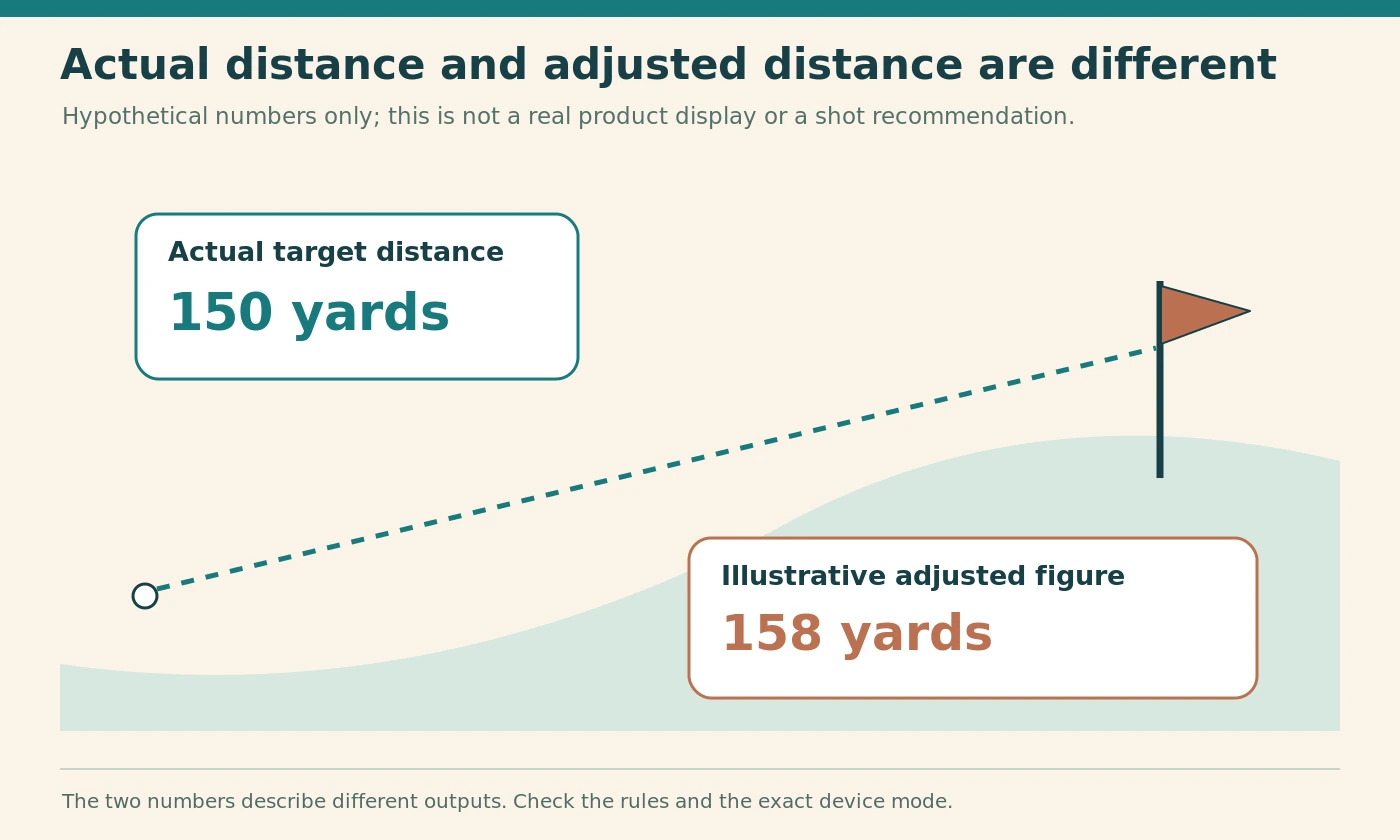
Actual distance and adjusted distance are different outputs
A conventional distance reading describes the measured distance to the target. A slope-related output adjusts or interprets distance using elevation information. Additional connected features may bring other information into the calculation, so the word slope does not necessarily describe everything an advanced device can do.
For example, Garmin's Approach Z30 manual describes a measured target distance separately from its PlaysLike figure. Its explanation also addresses information supplied by a compatible connected device. This is an exact-model example, not a claim that all rangefinders calculate an adjustment identically. [4]
More numbers do not automatically mean a better competition tool
For a hypothetical illustration, imagine a screen showing an actual distance of 150 yards and an adjusted figure of 158 yards. Those invented numbers explain the distinction; they are not a measured shot, a manufacturer's accuracy claim or a recommendation to choose a particular club.
When evaluating a device, decide whether you need the extra function outside rounds requiring compliant use. Then assess how clearly it can be disabled and verified. A feature you rarely use may still create another setting to understand and maintain.
Know the official rule before examining a switch
Permission relates to use
Rule 4.3 addresses how equipment is used rather than simply what is carried. It permits distance and direction information but prohibits measuring elevation changes and certain interpretation, such as device-generated club or line recommendations based on the ball's location. Read the current rule for the complete framework. [1]
This distinction explains why a product's capabilities and your particular use are separate questions. However, it should not be treated as an invitation to keep prohibited information visible and promise to ignore it. The practical approach is to configure the device so that the relevant output is not presented during use.
Use the governing source, not a packaging slogan
The R&A's short distance-measuring-device guide is a useful starting point, while the full rule resolves more detailed questions. A seller's phrase such as tournament legal is not a substitute for either source or for the event's published conditions. [3]
Keep those responsibilities separate in your mind: the manufacturer explains the controls, the rules define permitted use and the Committee applies the rules to the event and particular facts. A clear product manual is valuable, but it does not perform all three jobs.
Check whether the event permits electronic distance measurement
Local Rule G-5 changes the first decision
The Committee may adopt Model Local Rule G-5 to prohibit obtaining distance information through an electronic distance-measuring device during the round. In that situation, switching slope off does not resolve the separate restriction on electronic distance measurement. [2]
Read the current event information rather than assuming last month's arrangement still applies. This matters when visiting another club, entering an open competition or moving between different formats organised at the same venue. The location alone does not identify every condition of the event.
Find the actual notice
Look for the Notice to Players, published Local Rules and the competition information supplied by the organiser. If a short statement is ambiguous, request the full wording or ask the Committee before play. Avoid relying on a casual answer from another entrant who has not checked it either.
Save the relevant information somewhere accessible before travelling. A saved copy is a convenience for preparation, not an excuse to ignore a later official update. At registration, confirm anything that remains uncertain rather than learning the answer after you have already used the device.
Rules and model guidance checked 4 October 2026. This decision aid does not replace a Committee ruling.
| Situation | First question | Practical response |
|---|---|---|
| Electronic DMD use permitted [1] | Are only permitted outputs being used? | Configure and confirm the exact device and companion screens. |
| G-5 adopted [2] | Does the event prohibit electronic distance measurement? | Turning slope off does not remove that separate restriction. |
| Switchable-slope model [4] [5] | How does this exact model disable and confirm the feature? | Use its manual, not another model's button sequence. |
| Unexpected information appears [1] | What was actually displayed and used? | Stop the uncertain use and seek the appropriate ruling. |
Treat competition mode as a control, not a certificate
Learn what the mode actually disables
A setting called tournament mode may disable particular functions on that device. Read the manual's description of those functions and check the rest of your equipment separately. The name alone does not explain every screen, paired application or optional feature you might use.
Write a short plain-English description in your own notes: which button changes the setting, what confirms it and which information should disappear. This is more useful than remembering a vague instruction to put the device into competition mode.
Verify the result as well as the action
Pressing a button is an action; seeing the expected state is a check. Build both into your routine. Outside a round, use the manual to identify the ordinary distance display and the indicator associated with the selected mode.
Do not assume that a beep, vibration or light necessarily confirms slope is disabled. Those signals can have other purposes, such as target acquisition or connection status. The manual for the exact model should explain which indication matters.
Use an exact-model example without generalising it
Garmin Approach Z30
The Z30 manual says that pressing MODE changes tournament mode and that enabling it disables PlaysLike. It identifies a solid blue tournament-mode LED as confirmation. The same manual distinguishes a longer MODE hold used for setup, so the duration of the button action matters. [4]
This example shows why it is worth reading more than a product headline. A new user who knows only that MODE changes settings could enter a different menu from the one intended. Practise the required action before a round rather than experimenting while another player waits.
Bushnell Tour V5 Shift
Bushnell's support page for the Tour V5 Shift identifies a slope switch that enables or disables slope-compensated ranging. Its page also distinguishes the unit-selection controls. Those instructions apply to that named model, not every Bushnell device or every product with Shift in its title. [5]
When buying second-hand, match the full model identification to the manual. Similar cases, packaging or accessories are not sufficient evidence that two versions have identical controls. Ask the seller to show the relevant setting and display before relying on the device for a competition.
Read the screen rather than guessing from its largest number
Identify each field at home
Outside play, work through the display diagram in the manual. Identify target distance, units, battery state, connection indicators and any secondary output. A smaller number can still be important; its reduced size does not make it irrelevant to the rules.
Use a clear, safe stationary target for familiarisation, following the manufacturer's handling guidance. Do not point a laser at people or vehicles or attempt to inspect the emitted beam. The purpose is to learn the display, not to test the safety limits of the device.
Check the number you intend to read
Once you recognise the fields, practise locating the permitted distance output quickly. A cluttered display may be manageable at home but less convenient with glasses, a glove or changing light. Readability is therefore part of the purchasing decision, not merely a cosmetic preference.
If you cannot confidently distinguish the fields, seek a demonstration or choose a simpler product. Buying more features than you can comfortably operate is not an obligation. The best tool for a round is one you can use correctly without repeated uncertainty.
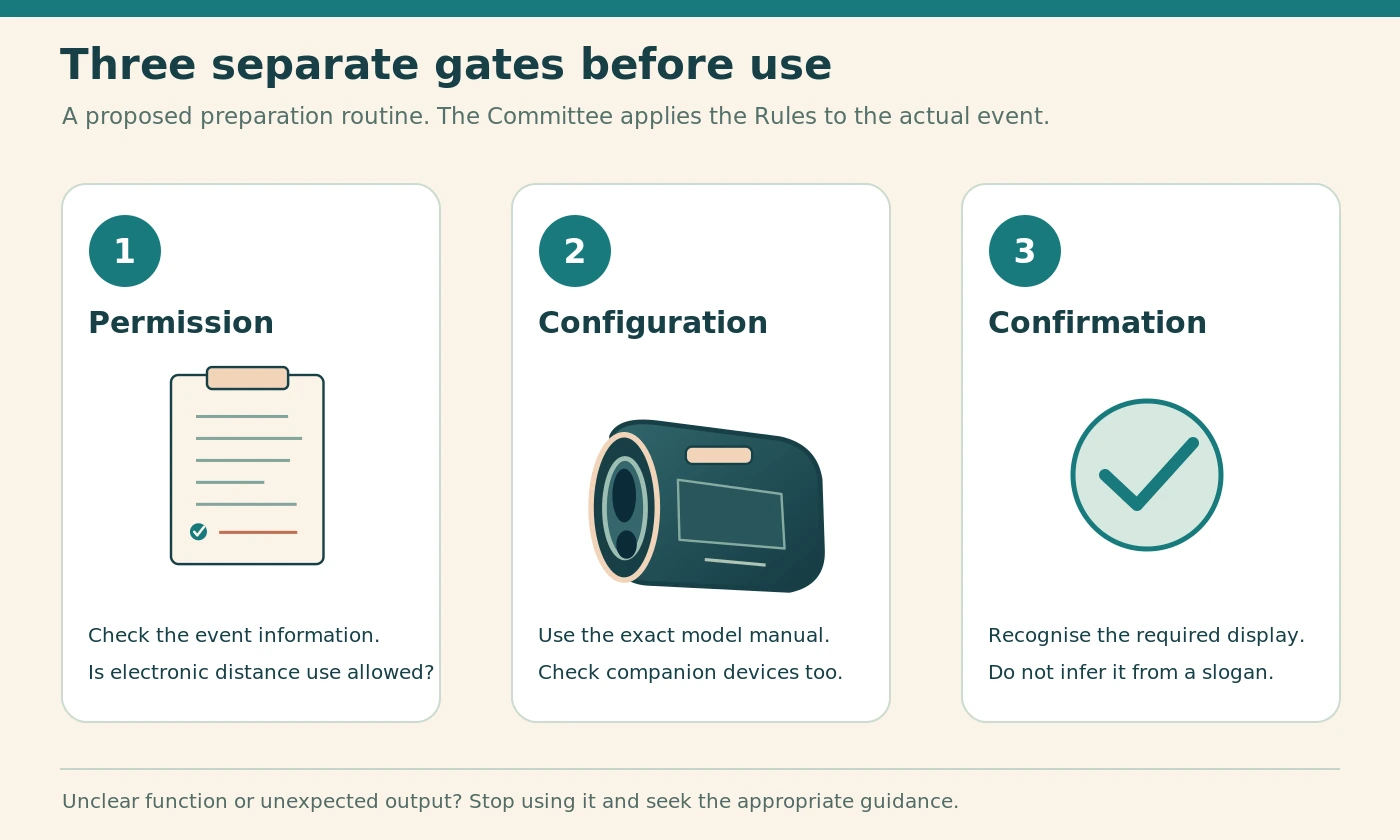
Build a three-gate checking routine
Gate one: permission for the round
Begin with the event information. Confirm whether electronic distance measurement is permitted and whether there are additional equipment conditions relevant to your setup. Resolve uncertainty before moving on to the device controls.
This gate is deliberately first. Otherwise, you can spend time proving that slope is off on equipment whose distance function is not permitted in that event anyway. The routine should answer the largest decision before the smaller settings questions.
Gates two and three: features and display
Next, configure the particular rangefinder and any companion devices using their manuals. Finally, verify the expected display and indicators. Treat permission, configuration and confirmation as separate steps rather than compressing them into the phrase "my rangefinder is legal".
This is a proposed preparation method, not an official R&A checklist or a guarantee against penalties. Its purpose is to make your checks observable and repeatable. Adapt the practical details to your actual equipment without weakening the three separate questions.
Recheck after borrowing, resetting or changing settings
A familiar device can have an unfamiliar state
A borrowed rangefinder may have been left in a different mode by its owner. A shared device can therefore deserve the same initial check as a new purchase. Ask the owner about the controls, then confirm them yourself against the manual.
The same caution applies after changing a battery, resetting settings or completing a software update. This does not mean every model changes its mode in those circumstances. It means you should verify the state rather than assume that an earlier check still describes it.
Keep the follow-up proportionate
You do not need to repeat an elaborate investigation before every shot. A simple pre-round check, familiarity with the normal display and another check after a relevant change make more sense than constant menu exploration.
If something looks different during play, stop using the uncertain function and obtain appropriate guidance. Do not cycle through unfamiliar settings merely to see what happens. A device that has become confusing is less useful than an ordinary distance source you understand and are permitted to use.
Check paired watches and phone applications independently
One switch may not govern the whole setup
A laser, watch and phone application can form a connected arrangement, but they remain several places where information may be displayed. Do not assume that changing a setting on the handheld unit automatically configures every companion device.
Garmin's Z30 manual explicitly discusses pairing with its application or a compatible device. That makes the separate manuals and settings relevant to the user's complete setup. Check only the functions you intend to use, but check them wherever they appear. [4]
Reduce unnecessary complexity
Before an event, decide whether you need every connected feature active. A straightforward arrangement with one understood distance display may be easier to manage than several overlapping screens. That is an editorial usability judgement, not a rule requiring you to own only one device.
Make a small equipment list: handheld unit, watch, phone application and any other device providing golf information. For each, record whether it will be used and which settings matter. This prevents an overlooked watch screen from sitting outside an otherwise careful preparation routine.
Do not confuse recording information with interpreting it
Separate later review from immediate assistance
Rule 4.3 distinguishes certain information recorded for later use from processing or interpretation during the round, including current-round club recommendations. This is another reason to examine what an application does rather than assume that all statistics features are equivalent. [1]
For your preparation, ask a concrete question: does this feature merely collect information for review later, or does it present an assessment intended to help the current shot? Take the exact feature description to the Committee when its status is unclear.
Avoid solving ambiguity through guesswork
A manufacturer may use a friendly name that does not reveal the underlying function. Open the relevant help page and read what data is used and what output is produced. Screenshots and a model name are more useful for a question than a broad statement that an application has artificial intelligence.
Do not assume that disabling one recommendation screen disables all related assistance. Equally, do not label every stored statistic prohibited. The goal is an accurate understanding of the particular feature, with a ruling where needed, rather than a blanket judgement about connected golf technology.
Keep training use separate from a rules-compliant round
Give each activity an explicit purpose
Outside a round that requires compliant use, slope-related information may be something you choose to explore as part of familiarisation or practice. Label that activity honestly. Do not carry the same device state into a competition simply because it was useful during preparation.
A helpful personal habit is to return the device to your normal competition-ready configuration after practice. That reduces reliance on remembering a change days later. Still perform the event-specific checks before play; a default setting is not a substitute for them.
Do not use the word casual as a shortcut
A round without a trophy can still involve rules or handicap-score requirements that matter. Ask the club or relevant handicapping authority how a score should be handled when uncertain, rather than assuming that every social round permits every function.
This guide does not decide whether a particular score is acceptable for handicapping. It helps you avoid the unnecessary equipment uncertainty in the first place. Be clear about the purpose of the round before choosing which information you will use.
Understand what a slope feature cannot promise
An adjusted number is not a guaranteed club choice
A device-generated adjustment is not a promise about your next shot. It cannot turn an invented example in a buying guide into a measured personal carry distance. Keep the product's stated function separate from assumptions about your swing or a particular landing result.
When comparing products outside competition, ask what the adjustment uses and what it leaves to the golfer. Do not presume that two devices showing different figures are both measuring the same thing or that the larger display is the more accurate one.
Avoid a false precision contest
A reading presented to a single yard can look precise without answering every practical uncertainty. Target selection, the meaning of each output and the user's own judgement remain separate issues. This article does not rank accuracy or claim laboratory testing.
For the competition purchase, clarity and control may matter more than the number of adjustment features. Choose functions because you understand their role, not because a long specification list makes a simpler model seem inadequate.
Decide whether a non-slope model suits your habits
Simplicity can be a deliberate advantage
A genuinely non-slope device removes the need to switch that particular feature between uses. This can suit a golfer who wants straightforward distance measurement and has no practical interest in an adjusted-distance function.
However, still examine the full specification and the rules for the round. The absence of slope does not explain every other feature, and the event's permission gate remains separate. Simplicity is useful only when you understand what has actually been simplified.
Compare the complete handling experience
Check whether you can read the display, identify the units, hold the device comfortably and return it to its case without confusion. Those practical details do not require a large feature list. Try the controls with the glove and glasses you normally use where appropriate.
A more expensive or more complex model is not automatically easier to use correctly. Conversely, a clear switchable-slope model may suit someone who genuinely values that extra function for other activities. Base the decision on your routine rather than a hierarchy of basic and serious golfers.
Evaluate a switchable-slope model before buying
Ask for a complete demonstration
Request a demonstration of both the control and its confirmation. Ask what appears when slope is enabled, what disappears when disabled and how the current state is shown after the device wakes. Use the exact manual to check the explanation.
Do this before committing to the purchase when possible. A seller who only points to a slogan has not answered the operational question. You need to know whether you can reliably recognise the state without relying on someone else each time.
Inspect the control in ordinary handling
Try opening and closing the case and holding the device normally. Observe whether your grip naturally rests on a setting control. Do not force, dismantle or modify anything; this is a usability check, not a durability test.
If the control is damaged, loose or difficult to interpret, seek the manufacturer's support rather than inventing a tape-based repair. A home-made mark may remind you of a setting, but it cannot replace a functioning control or establish a manufacturer's intended behaviour.
Prepare the day before an event
Put the documents and equipment together
Check the event information, identify the relevant model manual and make sure the equipment is ready to use. Leave enough time to resolve a question with the organiser or manufacturer rather than discovering it while packing the car.
Your preparation note can be very short: event permission checked, exact device identified, required mode confirmed and companion screens reviewed. Add the date and any unanswered question. This is a personal aid, not proof that overrides a change in circumstances.
Plan a fallback
Decide what you will do if the device cannot be used or its settings become uncertain. That may mean relying on permitted course distance information or simply not using the electronic aid. The appropriate alternative depends on the event and available information.
A fallback reduces the temptation to persist with an unfamiliar mode because you feel dependent on the equipment. You do not need a second expensive gadget to have a plan. A willingness to stop using the uncertain device is often the most practical part.
Complete a short pre-start check
Confirm the current situation
At the venue, check for relevant updates to the competition information. Then verify your equipment state before starting the round. Use the same clear sequence you practised rather than inventing a new one under time pressure.
Make sure the units are the ones you expect. Units do not determine whether slope is disabled, but confusing yards and metres can create a separate practical problem. Keep the unit check distinct from the mode check so that one does not accidentally stand in for the other.
Put the device away in a known state
After confirming it, store the rangefinder normally and avoid unnecessary settings changes. If another person borrows it before the start, check it again on return. The point is not distrust; it is simply that your previous check described an earlier state.
This proposed routine should take only the time needed to perform it carefully on equipment you know. There is no universal number of seconds that proves compliance. Familiarity matters more than rushing to complete a checklist by a target time.
Respond sensibly when something looks wrong during play
Stop using the uncertain output
If an unexpected figure or icon appears, do not keep taking readings while experimenting with menus. Stop using the uncertain feature and ask for the appropriate ruling or assistance. The current Rule 4.3 directs players with uncertainty about equipment use to the Committee. [1]
Record the facts accurately: the device and mode, what was displayed, what you did and when it happened. Avoid repeatedly recreating the situation during the round just to obtain a better photograph. Explain what you actually observed rather than what you think the device probably intended.
Do not adjudicate by group vote
Another player's familiarity with a different model may be helpful background, but it is not a substitute for a ruling. Keep the conversation factual and respectful. Do not pressure someone to agree that an incident was harmless because the adjusted and actual numbers were similar.
Likewise, do not assume the most severe outcome without checking the facts. The proper response is accurate disclosure and the applicable procedure, not concealment or an improvised penalty. Prevention is preferable, but a clear account remains valuable when a problem occurs.
Understand the penalty framework without oversimplifying it
First and subsequent breaches
The general penalty means losing the hole in match play or adding two penalty strokes in stroke play. [6]
The published Rule 4.3 specifies the general penalty for a first breach and disqualification for a second breach subject to its intervening-event condition. A breach between holes has a stated next-hole application. Consult the rule and Committee rather than reducing every incident to a count of button presses. [1]
That qualification matters because a simple slogan can mislead in either direction. This article is not a casebook covering every sequence of actions. It provides the framework and the reason to seek an appropriate ruling when the particular facts matter.
Keep prevention separate from penalty advice
Your personal checklist should aim to avoid prohibited use, not calculate how close you can get to a penalty. Do not treat a first-breach provision as an allowance to experiment. The equipment question should be settled as far as possible before the round.
After an incident, review your preparation routine once the official process is complete. Was the mode unclear, was a device borrowed, or was an unfamiliar application involved? A specific practical correction is more useful than simply promising to be more careful next time.
Ask a precise question when you need help
For the manufacturer
Give the full model, relevant software version where applicable and a description of the control or display you cannot understand. Ask which documented setting disables the particular output and how the state is confirmed. The manufacturer's role is to explain the equipment.
Avoid asking only whether the device is competition legal. That broad wording may receive a marketing answer while leaving your actual control problem unresolved. A photograph taken outside play can help identify an icon, provided it shows the relevant screen clearly.
For the Committee
Explain the event, the device and the exact function you propose to use or have used. Supply the relevant manual description rather than expecting the Committee to infer capabilities from a brand name. Ask how the rule applies to those facts.
Separating the two questions saves time. The Committee need not become a repair service, and the manufacturer need not decide the event's Local Rules. You get a clearer answer when you ask each party about the matter within its role.
Keep settings manageable through the season
Revisit the routine after a meaningful change
A new device, changed application, firmware update or different event is a reason to review the relevant parts of your notes. Do not rewrite everything merely because time has passed, but do not assume old instructions apply to a replacement model.
Store the exact manual link or downloaded manual with the model name. A generic search for your brand can surface a newer product with different controls. The correct reference should be easy to find without comparing product photographs in a hurry.
Retire uncertainty rather than carrying it forward
When a control repeatedly behaves unexpectedly, resolve it through support before relying on the device again. A recurring unexplained display is not made acceptable by becoming familiar. Consider a simpler alternative if the operational burden outweighs the function's value to you.
At the same time, keep the response proportionate. A clearly explained icon or an accidentally changed unit may need only a better routine, not a new purchase. Diagnose the information problem before deciding that the equipment itself must be replaced.
Inspect a used device as equipment, not just a bargain
Confirm the identity before the features
Ask for a clear model identification and check that the manual refers to that exact version. A box or case can be exchanged between products, so do not rely on packaging alone. If the seller cannot demonstrate the relevant control, recognise the uncertainty before paying.
Look for an intact, usable control and a readable display through the normal viewing position. Do not dismantle the device or attempt to bypass a damaged switch. A reduction in price does not answer the practical question of whether you can establish the required state reliably.
Keep an acceptance check separate from an accuracy test
A short demonstration can establish that a button operates and the expected indicator appears. It does not certify the device's ranging accuracy or prove that every connected feature behaves as advertised. State those limits clearly when deciding what you have actually checked.
Ask about the seller's return process and any available manufacturer support for that model. A used purchase can be sensible when the equipment and documentation are clear, but an unexplained secondary display should not become your problem on the first competition morning.
Make the routine accessible to the person using it
Check visibility and dexterity in a calm setting
A technically clear indicator is not useful if you cannot comfortably see it through your usual glasses or operate the control without confusion. Ask for time to inspect the display outside a round. Use the normal viewing adjustment described by the manufacturer rather than modifying the optics.
Pay attention to whether you can distinguish the relevant state without relying only on a colour that is difficult for you to identify. Another documented indicator or a different device may be more practical. Do not assume that every product offers the same accessibility options.
Choose understandable equipment without self-judgement
The point is not to demonstrate that you can master the most complicated product. A simpler arrangement can be a deliberate choice that removes an unnecessary task from your round. Compare what you can use comfortably and confidently, not what another golfer considers impressive.
Where you need assistance or a particular equipment arrangement for a disability, discuss the actual needs with the Committee in advance. Do not infer an exemption from a buying guide. Advance clarity helps you plan appropriate equipment without leaving an important question to the teeing area.
Pros and cons of the two approaches
Non-slope simplicity
The principal practical attraction of a non-slope model is fewer slope-related decisions to manage. It can be a sensible choice for a golfer whose intended use is ordinary distance measurement and who prefers a straightforward display.
The trade-off is the absence of that extra function for other uses. That is a limitation only if you genuinely need it. Do not pay to solve a problem you do not have, and do not assume that a simpler device removes the need to read event information.
Switchable flexibility
A switchable model can support different routines with one piece of equipment. Its value depends on a clear, dependable control and a user who understands the current state. Evaluate that combination rather than the feature in isolation.
The extra responsibility is configuration and verification. A complicated setup may be perfectly manageable for one golfer and unnecessarily distracting for another. Neither preference establishes playing ability; it is a decision about how you want to manage equipment.
Common mistakes to avoid
Treating one clue as the whole answer
Do not use a case colour, brand name, vibration or tournament sticker as a substitute for checking the exact function. Avoid copying a friend's button sequence without confirming the model. A similar-looking device can have different controls.
Another mistake is carefully checking the laser but ignoring a paired watch or application. Review the equipment you will actually use as a whole, while keeping each device's settings distinct. One reassuring indicator does not describe every screen in the arrangement.
Leaving the decision until the first approach shot
The middle of a round is a poor time to learn an unfamiliar menu. Prepare beforehand, know the ordinary display and have a fallback. Do not rely on the hope that an adjusted number will be small enough not to matter.
Finally, avoid converting this guide into a personal ruling on an incident. Use the current official text and the Committee for that purpose. A buying and preparation guide is most useful when it prevents uncertainty rather than pretending to replace the rules process.
Frequently asked questions
Can I carry a slope-capable rangefinder during a competition?
The relevant distinction is capability versus use, together with the event's conditions. Establish what information you may obtain, configure the device accordingly and confirm its state. Do not assume that carrying an advanced device requires using every feature, or that possession alone tells you whether a particular action is permitted. [1]
Does turning slope off make every rangefinder acceptable for every event?
No. First check whether electronic distance measurement is permitted for that event, including any applicable Local Rule. Then check the individual functions and actual use. A successful slope-off check answers one equipment question; it does not replace the separate event-permission decision. [2]
Is a non-slope rangefinder automatically the safer purchase?
It can simplify one part of the routine, but the overall choice still depends on clear controls, readable information and your intended use. Inspect the complete specification. A straightforward product you understand can be preferable to extra features you do not need, without being a universal recommendation for every golfer.
What does a blue light mean on a rangefinder?
There is no universal answer across brands and models. Consult the exact manual and distinguish a steady light from a flashing one where the instructions do so. Do not transfer the Z30 example in this guide to another device merely because its indicator is also blue.
Can I rely on another player to check the settings?
A second pair of eyes may help, but learn how to recognise the state yourself. Give the other person the exact manual rather than asking them to guess from experience with another model. Questions about the rules or a real incident should go to the Committee, not be settled by informal agreement.
What should I do after lending the device to someone?
Check the settings and display again before your next intended use. You do not need to assume the borrower changed anything; you simply need to confirm the current state. This is particularly sensible when the device is shared between practice sessions and rounds with different equipment requirements.
Should I leave slope disabled all the time?
That can be a convenient personal default when you rarely use the extra function. It does not eliminate the event check or the need to understand other features. Choose a routine you can repeat reliably, and recheck after a meaningful change rather than treating one old setting as permanent proof.
Final recommendation
Choose the simplest rangefinder setup that supports your actual needs, then learn its controls before relying on it. A switchable-slope model needs a clear way to disable and confirm the relevant feature; a non-slope model still needs to be used within the event's rules.
Work through permission, configuration and display in that order. Keep companion devices inside the same preparation routine, use the exact model manual and stop when an unexplained output appears. For a real rules question, take accurate facts to the Committee rather than relying on a slogan, a friend's recollection or an improvised interpretation.
Sources and fact-checking notes
Editorial review: 4 October 2026. Named product and service details come from the official sources below. The practical checking routines and hypothetical examples are editorial guidance, not reported hands-on tests. Specifications, availability and terms can change; confirm the exact model or booking before acting.
- The R&A – Rule 4Equipment use, distance/elevation distinctions and the Rule 4.3 penalty framework, including its intervening-event condition.
- The R&A – Model Local RulesModel Local Rule G-5 allows the Committee to prohibit electronic distance measurement during a round.
- The R&A – distance-measuring devicesShort official explanation of the basic distinction and possible Local Rule.
- Garmin – Approach Z30 owner's manualPrinted pages 4-5: display, PlaysLike and tournament mode. MODE and solid blue LED details apply only to Z30.
- Bushnell – Tour V5 Shift supportExact-model slope switch and unit-control instructions; not extrapolated to other versions.
- The R&A – general penaltyLoss of hole in match play and two penalty strokes in stroke play.
Illustrations in this article were created for Taylor’s Trailblazing Golf Gear. Third-party photographs, where used, are credited beside the image or in the source list.